Retrieval-Augmented Generation (RAG) has become the standard approach for grounding LLM responses in real data. But basic RAG has fundamental limitations: it retrieves a fixed number of chunks from a single vector store and hopes the answer is somewhere in there. What happens when the answer requires a SQL query? Or live web data? Or when the retrieved chunks aren't relevant enough and the model needs to reformulate its search?
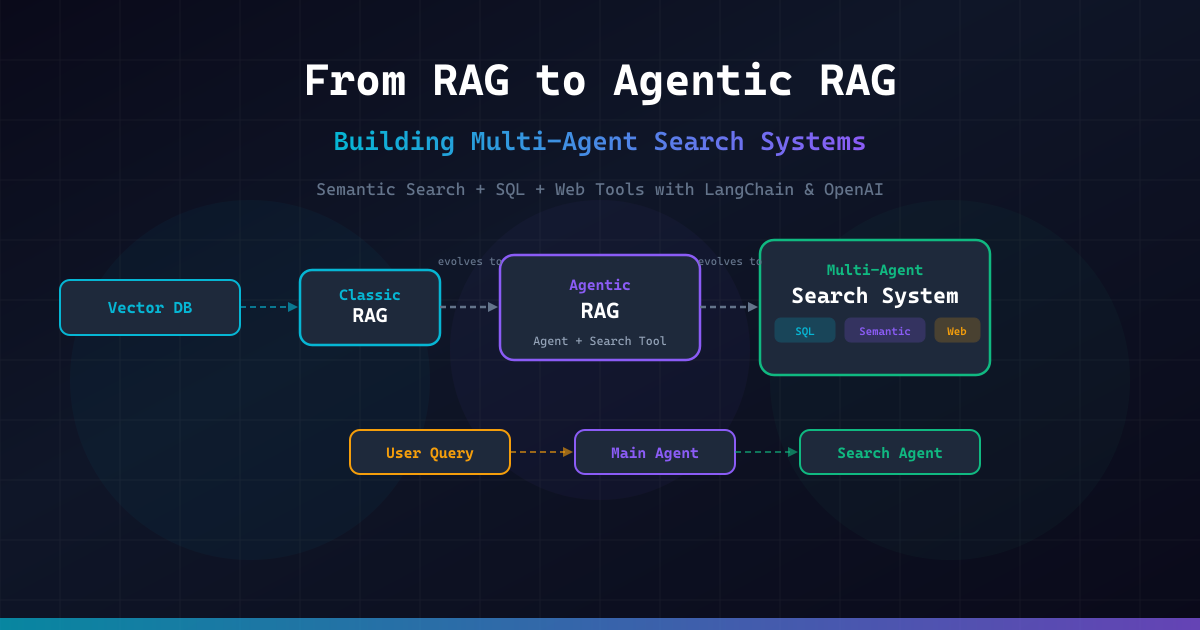
This article walks through three evolutionary stages of retrieval-powered AI systems:
- Classic RAG — the foundational pattern with vector embeddings, chunk retrieval, and augmented generation
- Agentic RAG — giving an AI agent a semantic search tool so it can decide when and what to retrieve, with the ability to reformulate queries
- Multi-Agent Search System — a dedicated Search Agent equipped with SQL, semantic search, and web search tools, invoked by a Main Agent whenever it needs information it doesn't have
Each stage includes a complete, runnable Python implementation using LangChain, OpenAI, and ChromaDB. By the end, you'll have a production-ready architecture where your main agent can seamlessly delegate complex information retrieval to a specialized search agent.
Part 1: Classic RAG
Classic RAG follows a simple three-step pipeline: embed → retrieve → generate. Documents are split into chunks, embedded into vectors, and stored in a vector database. When a query arrives, it's embedded and matched against stored vectors to find the most relevant chunks. These chunks are injected into the LLM prompt as context.
This approach works well for straightforward factual questions against a known corpus. But it has significant blind spots:
- No query reformulation — if the initial search terms don't match the document vocabulary, you get irrelevant results
- Single retrieval source — you can only search the vector store, not databases or the web
- Fixed retrieval count — you always retrieve k chunks whether you need 1 or 20
- No relevance judgment — the model can't decide that retrieved chunks are useless and try again
Despite these limitations, Classic RAG is the essential foundation. Let's build it.
import asyncio
from dataclasses import dataclass, field
from typing import Optional

from langchain_openai import OpenAIEmbeddings, ChatOpenAI
from langchain_chroma import Chroma
from langchain.text_splitter import RecursiveCharacterTextSplitter
from langchain_core.documents import Document
from langchain_core.prompts import ChatPromptTemplate


@dataclass
class RAGConfig:
    """Configuration for the Classic RAG pipeline."""
    collection_name: str = "knowledge_base"
    chunk_size: int = 500
    chunk_overlap: int = 100
    top_k: int = 4
    embedding_model: str = "text-embedding-3-small"
    llm_model: str = "gpt-4o-mini"
    temperature: float = 0.0


@dataclass
class RetrievalResult:
    """Result from a retrieval operation."""
    query: str
    documents: list[Document]
    scores: list[float] = field(default_factory=list)


class ClassicRAG:
    """
    Classic RAG pipeline: embed documents, retrieve relevant chunks,
    and generate answers augmented with retrieved context.
    """

    def __init__(self, config: Optional[RAGConfig] = None):
        self.config = config or RAGConfig()
        self.embeddings = OpenAIEmbeddings(model=self.config.embedding_model)
        self.llm = ChatOpenAI(
            model=self.config.llm_model,
            temperature=self.config.temperature,
        )
        self.text_splitter = RecursiveCharacterTextSplitter(
            chunk_size=self.config.chunk_size,
            chunk_overlap=self.config.chunk_overlap,
        )
        self.vectorstore: Optional[Chroma] = None

    def ingest_documents(self, documents: list[Document]) -> int:
        """
        Split documents into chunks and store them in the vector database.

        Args:
            documents: List of LangChain Document objects to ingest.

        Returns:
            Number of chunks stored.
        """
        chunks = self.text_splitter.split_documents(documents)

        self.vectorstore = Chroma.from_documents(
            documents=chunks,
            embedding=self.embeddings,
            collection_name=self.config.collection_name,
        )

        print(f"Ingested {len(documents)} documents → {len(chunks)} chunks")
        return len(chunks)

    def retrieve(self, query: str) -> RetrievalResult:
        """
        Retrieve the most relevant chunks for a given query.

        Args:
            query: The user's question or search query.

        Returns:
            RetrievalResult with matched documents and similarity scores.
        """
        if not self.vectorstore:
            raise ValueError("No documents ingested. Call ingest_documents() first.")

        results = self.vectorstore.similarity_search_with_relevance_scores(
            query, k=self.config.top_k
        )

        documents = [doc for doc, _ in results]
        scores = [score for _, score in results]

        return RetrievalResult(query=query, documents=documents, scores=scores)

    async def generate(self, query: str) -> str:
        """
        Full RAG pipeline: retrieve context and generate an answer.

        Args:
            query: The user's question.

        Returns:
            The LLM-generated answer grounded in retrieved context.
        """
        retrieval = self.retrieve(query)

        context = "\n\n---\n\n".join(
            f"[Source: {doc.metadata.get('source', 'unknown')}]\n{doc.page_content}"
            for doc in retrieval.documents
        )

        prompt = ChatPromptTemplate.from_messages([
            ("system", (
                "You are a helpful assistant. Answer the user's question based "
                "ONLY on the provided context. If the context doesn't contain "
                "enough information, say so clearly.\n\n"
                "Context:\n{context}"
            )),
            ("human", "{question}"),
        ])

        chain = prompt | self.llm
        response = await chain.ainvoke({
            "context": context,
            "question": query,
        })

        return response.content


# --- Example usage ---

SAMPLE_DOCUMENTS = [
    Document(
        page_content=(
            "Retrieval-Augmented Generation (RAG) is a technique that combines "
            "information retrieval with text generation. It was introduced by "
            "Lewis et al. in 2020. RAG first retrieves relevant documents from "
            "a knowledge base, then uses them as context for the language model "
            "to generate more accurate and grounded responses."
        ),
        metadata={"source": "rag_overview.md"},
    ),
    Document(
        page_content=(
            "Vector databases store data as high-dimensional vectors (embeddings). "
            "Popular options include ChromaDB, Pinecone, Weaviate, and Qdrant. "
            "They enable similarity search by finding vectors closest to a query "
            "vector using metrics like cosine similarity or dot product."
        ),
        metadata={"source": "vector_databases.md"},
    ),
    Document(
        page_content=(
            "Text embedding models convert text into dense vector representations. "
            "OpenAI's text-embedding-3-small produces 1536-dimensional vectors. "
            "These embeddings capture semantic meaning, allowing similar concepts "
            "to have vectors that are close together in the embedding space."
        ),
        metadata={"source": "embeddings_guide.md"},
    ),
    Document(
        page_content=(
            "Chunking strategies significantly affect RAG quality. Common approaches "
            "include fixed-size chunking, recursive character splitting, semantic "
            "chunking, and sentence-window chunking. The optimal chunk size depends "
            "on the use case — smaller chunks improve precision but may lose context, "
            "while larger chunks preserve context but may dilute relevance."
        ),
        metadata={"source": "chunking_strategies.md"},
    ),
]


async def main():
    rag = ClassicRAG()
    rag.ingest_documents(SAMPLE_DOCUMENTS)

    questions = [
        "What is RAG and who introduced it?",
        "What are the popular vector databases?",
        "How does text embedding work?",
    ]

    for question in questions:
        print(f"\nQ: {question}")
        answer = await rag.generate(question)
        print(f"A: {answer}")


if __name__ == "__main__":
    asyncio.run(main())
This Classic RAG implementation demonstrates the full embed-retrieve-generate pipeline with ChromaDB as the vector store, relevance scoring, and a system prompt that constrains the LLM to answer only from retrieved context.
Classic RAG is powerful for its simplicity, but notice how rigid it is: the retrieval always happens once, always fetches the same number of chunks, and the LLM has no way to say "these results aren't useful, let me search differently." That's where Agentic RAG comes in.
Part 2: Agentic RAG
Agentic RAG transforms retrieval from a static pipeline into a dynamic, agent-driven process. Instead of blindly retrieving chunks and hoping for the best, we give an AI agent a semantic search tool and let it decide:
- When to search — maybe the agent already knows the answer
- What to search for — the agent can reformulate queries for better results
- How many times to search — the agent can search multiple times with different queries
- Whether results are good enough — the agent can evaluate retrieved chunks and retry
This is a fundamental shift: the retrieval step goes from being a fixed pipeline stage to being a tool the agent uses at its discretion.
import asyncio
from dataclasses import dataclass, field
from typing import Optional, Any

from langchain_openai import OpenAIEmbeddings, ChatOpenAI
from langchain_chroma import Chroma
from langchain.text_splitter import RecursiveCharacterTextSplitter
from langchain_core.documents import Document
from langchain_core.tools import tool
from langchain_core.messages import HumanMessage, SystemMessage
from langchain_core.prompts import ChatPromptTemplate


@dataclass
class AgenticRAGConfig:
    """Configuration for the Agentic RAG system."""
    collection_name: str = "agentic_kb"
    chunk_size: int = 500
    chunk_overlap: int = 100
    top_k: int = 4
    embedding_model: str = "text-embedding-3-small"
    agent_model: str = "gpt-4o"
    temperature: float = 0.0


class SemanticSearchTool:
    """
    Wraps the vector store as a tool that an agent can invoke.
    The agent decides when and how to use it.
    """

    def __init__(self, config: AgenticRAGConfig):
        self.config = config
        self.embeddings = OpenAIEmbeddings(model=config.embedding_model)
        self.vectorstore: Optional[Chroma] = None
        self.text_splitter = RecursiveCharacterTextSplitter(
            chunk_size=config.chunk_size,
            chunk_overlap=config.chunk_overlap,
        )

    def ingest(self, documents: list[Document]) -> int:
        """Ingest documents into the vector store."""
        chunks = self.text_splitter.split_documents(documents)
        self.vectorstore = Chroma.from_documents(
            documents=chunks,
            embedding=self.embeddings,
            collection_name=self.config.collection_name,
        )
        print(f"Ingested {len(documents)} docs → {len(chunks)} chunks")
        return len(chunks)

    def search(self, query: str, top_k: Optional[int] = None) -> str:
        """
        Search the vector store and return formatted results.

        Args:
            query: The search query (can be reformulated by the agent).
            top_k: Number of results to return.

        Returns:
            Formatted string with retrieved documents and scores.
        """
        if not self.vectorstore:
            return "Error: No documents have been ingested yet."

        k = top_k or self.config.top_k
        results = self.vectorstore.similarity_search_with_relevance_scores(query, k=k)

        if not results:
            return f"No results found for query: '{query}'"

        formatted = []
        for i, (doc, score) in enumerate(results, 1):
            source = doc.metadata.get("source", "unknown")
            formatted.append(
                f"[Result {i}] (relevance: {score:.3f}, source: {source})\n"
                f"{doc.page_content}"
            )

        return "\n\n---\n\n".join(formatted)


class AgenticRAG:
    """
    Agentic RAG: an AI agent with a semantic search tool.
    The agent decides when to search, can reformulate queries,
    and can search multiple times to find the best answer.
    """

    def __init__(self, config: Optional[AgenticRAGConfig] = None):
        self.config = config or AgenticRAGConfig()
        self.search_tool = SemanticSearchTool(self.config)
        self.llm = ChatOpenAI(
            model=self.config.agent_model,
            temperature=self.config.temperature,
        )

        # Create the tool function that the agent can call
        @tool
        def semantic_search(query: str) -> str:
            """Search the knowledge base for relevant information.
            Use this tool when you need to find specific facts, definitions,
            or details from the documents. You can call this multiple times
            with different queries to find the best information."""
            return self.search_tool.search(query)

        self.tools = [semantic_search]
        self.agent = self.llm.bind_tools(self.tools)

    def ingest_documents(self, documents: list[Document]) -> int:
        """Ingest documents into the knowledge base."""
        return self.search_tool.ingest(documents)

    async def query(self, question: str, max_iterations: int = 5) -> str:
        """
        Process a question using the agentic RAG approach.
        The agent can search multiple times and reformulate queries.

        Args:
            question: The user's question.
            max_iterations: Max tool-call iterations to prevent infinite loops.

        Returns:
            The agent's final answer.
        """
        system_prompt = (
            "You are a research assistant with access to a knowledge base. "
            "Use the semantic_search tool to find information before answering. "
            "If the first search doesn't return relevant results, try rephrasing "
            "your query or searching for related terms. "
            "Always ground your answers in the retrieved information. "
            "If you truly cannot find the answer after multiple searches, say so."
        )

        messages = [
            SystemMessage(content=system_prompt),
            HumanMessage(content=question),
        ]

        for iteration in range(max_iterations):
            response = await self.agent.ainvoke(messages)
            messages.append(response)

            # If no tool calls, the agent is done
            if not response.tool_calls:
                return response.content

            # Process each tool call
            for tool_call in response.tool_calls:
                tool_name = tool_call["name"]
                tool_args = tool_call["args"]

                print(f"  [Iteration {iteration + 1}] Agent calls: "
                      f"{tool_name}(query='{tool_args.get('query', '')}')")

                # Execute the tool
                for t in self.tools:
                    if t.name == tool_name:
                        result = t.invoke(tool_args)
                        break
                else:
                    result = f"Unknown tool: {tool_name}"

                # Add tool result to conversation
                from langchain_core.messages import ToolMessage
                messages.append(
                    ToolMessage(content=result, tool_call_id=tool_call["id"])
                )

        return messages[-1].content if messages else "Max iterations reached."


# --- Example usage ---

SAMPLE_DOCUMENTS = [
    Document(
        page_content=(
            "Retrieval-Augmented Generation (RAG) was introduced by Patrick Lewis "
            "et al. in their 2020 paper. It combines a retriever (typically a dense "
            "passage retriever) with a sequence-to-sequence generator. The retriever "
            "finds relevant passages from a knowledge source, and the generator "
            "produces answers conditioned on both the question and retrieved passages."
        ),
        metadata={"source": "rag_paper.md"},
    ),
    Document(
        page_content=(
            "Agentic RAG extends classic RAG by giving an AI agent control over "
            "the retrieval process. Instead of a fixed pipeline, the agent decides "
            "when to search, what queries to use, and whether the results are "
            "sufficient. This enables query reformulation, multi-step retrieval, "
            "and adaptive search strategies."
        ),
        metadata={"source": "agentic_rag.md"},
    ),
    Document(
        page_content=(
            "ChromaDB is an open-source embedding database designed for AI "
            "applications. It supports in-memory and persistent storage, "
            "automatic embedding generation, and metadata filtering. ChromaDB "
            "is commonly used with LangChain for building RAG pipelines."
        ),
        metadata={"source": "chromadb_docs.md"},
    ),
    Document(
        page_content=(
            "LangChain is a framework for developing applications powered by "
            "language models. It provides tools for building chains, agents, "
            "and retrieval systems. Key components include document loaders, "
            "text splitters, embedding models, vector stores, and agent toolkits."
        ),
        metadata={"source": "langchain_overview.md"},
    ),
    Document(
        page_content=(
            "Query reformulation is a technique where the search query is rewritten "
            "to improve retrieval results. Methods include HyDE (Hypothetical "
            "Document Embeddings), query expansion, step-back prompting, and "
            "multi-query retrieval. These techniques help bridge the vocabulary "
            "gap between user questions and document content."
        ),
        metadata={"source": "query_techniques.md"},
    ),
]


async def main():
    agent = AgenticRAG()
    agent.ingest_documents(SAMPLE_DOCUMENTS)

    questions = [
        "What is the difference between classic RAG and agentic RAG?",
        "Who created the RAG technique and what year was it published?",
        "What tools does LangChain provide for building retrieval systems?",
    ]

    for question in questions:
        print(f"\nQ: {question}")
        answer = await agent.query(question)
        print(f"A: {answer}")


if __name__ == "__main__":
    asyncio.run(main())
This Agentic RAG implementation wraps the vector store as an agent tool. The agent autonomously decides when to search, can reformulate queries, and iterates until it finds a satisfactory answer — a dramatic improvement over the static Classic RAG pipeline.
The key insight is that the agent reasons about retrieval. If a search for "RAG limitations" returns nothing useful, the agent might try "problems with retrieval augmented generation" or "challenges in RAG pipelines." This adaptive behavior is impossible in Classic RAG.
But what if the agent needs information that isn't in the vector store at all? What if it needs to query a SQL database or search the live web? That's where we need a dedicated Search Agent.
Part 3: Multi-Agent Search System
The Multi-Agent Search System is the most powerful architecture. It separates concerns into two agents:
- Main Agent — the user-facing agent that handles conversations, reasoning, and task execution. When it needs information, it delegates to the Search Agent.
- Search Agent — a specialized agent equipped with three tools: semantic search (vector database), SQL search (structured data), and web search (live internet data). It determines which tool(s) to use based on the query.
This design follows the Orchestrator-Workers pattern: the Main Agent orchestrates the workflow, and the Search Agent is a specialized worker focused on information retrieval.
import asyncio
import json
import sqlite3
from dataclasses import dataclass, field
from typing import Optional, Any
from pathlib import Path

from langchain_openai import OpenAIEmbeddings, ChatOpenAI
from langchain_chroma import Chroma
from langchain.text_splitter import RecursiveCharacterTextSplitter
from langchain_core.documents import Document
from langchain_core.tools import tool
from langchain_core.messages import (
    HumanMessage, SystemMessage, AIMessage, ToolMessage
)


# ============================================================
# Tool 1: Semantic Search (Vector Database)
# ============================================================

class SemanticSearchEngine:
    """Vector-based semantic search over a document knowledge base."""

    def __init__(
        self,
        collection_name: str = "search_kb",
        embedding_model: str = "text-embedding-3-small",
        chunk_size: int = 500,
        chunk_overlap: int = 100,
    ):
        self.embeddings = OpenAIEmbeddings(model=embedding_model)
        self.collection_name = collection_name
        self.text_splitter = RecursiveCharacterTextSplitter(
            chunk_size=chunk_size, chunk_overlap=chunk_overlap
        )
        self.vectorstore: Optional[Chroma] = None

    def ingest(self, documents: list[Document]) -> int:
        """Ingest documents into the vector store."""
        chunks = self.text_splitter.split_documents(documents)
        self.vectorstore = Chroma.from_documents(
            documents=chunks,
            embedding=self.embeddings,
            collection_name=self.collection_name,
        )
        return len(chunks)

    def search(self, query: str, top_k: int = 4) -> str:
        """Search for relevant document chunks."""
        if not self.vectorstore:
            return "Error: No documents ingested."

        results = self.vectorstore.similarity_search_with_relevance_scores(
            query, k=top_k
        )
        if not results:
            return f"No results found for: '{query}'"

        formatted = []
        for i, (doc, score) in enumerate(results, 1):
            source = doc.metadata.get("source", "unknown")
            formatted.append(
                f"[Result {i}] (score: {score:.3f}, source: {source})\n"
                f"{doc.page_content}"
            )
        return "\n\n".join(formatted)


# ============================================================
# Tool 2: SQL Search (Structured Database)
# ============================================================

class SQLSearchEngine:
    """SQL-based search for querying structured data."""

    def __init__(self, db_path: str = ":memory:"):
        self.conn = sqlite3.connect(db_path)
        self.conn.row_factory = sqlite3.Row
        self._initialized = False

    def initialize_sample_data(self) -> None:
        """Create sample tables with data for demonstration."""
        cursor = self.conn.cursor()

        cursor.execute("""
            CREATE TABLE IF NOT EXISTS products (
                id INTEGER PRIMARY KEY,
                name TEXT NOT NULL,
                category TEXT NOT NULL,
                price REAL NOT NULL,
                stock INTEGER NOT NULL,
                description TEXT
            )
        """)

        cursor.execute("""
            CREATE TABLE IF NOT EXISTS customers (
                id INTEGER PRIMARY KEY,
                name TEXT NOT NULL,
                email TEXT NOT NULL,
                tier TEXT NOT NULL,
                total_orders INTEGER DEFAULT 0
            )
        """)

        cursor.execute("""
            CREATE TABLE IF NOT EXISTS orders (
                id INTEGER PRIMARY KEY,
                customer_id INTEGER,
                product_id INTEGER,
                quantity INTEGER,
                total_price REAL,
                order_date TEXT,
                status TEXT,
                FOREIGN KEY (customer_id) REFERENCES customers(id),
                FOREIGN KEY (product_id) REFERENCES products(id)
            )
        """)

        # Sample data
        products = [
            (1, "GPU Server A100", "hardware", 15000.00, 23, "NVIDIA A100 80GB GPU server"),
            (2, "Vector DB License", "software", 500.00, 999, "Annual ChromaDB enterprise license"),
            (3, "LLM API Credits", "service", 100.00, 9999, "10K API calls for GPT-4o"),
            (4, "RAG Toolkit Pro", "software", 299.00, 500, "Enterprise RAG pipeline toolkit"),
            (5, "Embedding Server", "hardware", 8000.00, 15, "Dedicated text embedding server"),
        ]

        customers = [
            (1, "Acme Corp", "acme@example.com", "enterprise", 47),
            (2, "StartupX", "hello@startupx.io", "startup", 12),
            (3, "DataLabs", "info@datalabs.ai", "enterprise", 89),
            (4, "Solo Dev Mike", "mike@dev.com", "individual", 3),
        ]

        orders = [
            (1, 1, 1, 2, 30000.00, "2026-04-01", "delivered"),
            (2, 1, 3, 50, 5000.00, "2026-04-05", "delivered"),
            (3, 2, 4, 1, 299.00, "2026-04-10", "shipped"),
            (4, 3, 1, 5, 75000.00, "2026-04-12", "processing"),
            (5, 3, 2, 10, 5000.00, "2026-04-12", "processing"),
            (6, 4, 3, 1, 100.00, "2026-04-15", "delivered"),
        ]

        cursor.executemany(
            "INSERT OR IGNORE INTO products VALUES (?, ?, ?, ?, ?, ?)", products
        )
        cursor.executemany(
            "INSERT OR IGNORE INTO customers VALUES (?, ?, ?, ?, ?)", customers
        )
        cursor.executemany(
            "INSERT OR IGNORE INTO orders VALUES (?, ?, ?, ?, ?, ?, ?)", orders
        )

        self.conn.commit()
        self._initialized = True

    def get_schema(self) -> str:
        """Return the database schema for the agent to understand the structure."""
        cursor = self.conn.cursor()
        cursor.execute("SELECT sql FROM sqlite_master WHERE type='table'")
        schemas = [row[0] for row in cursor.fetchall() if row[0]]
        return "\n\n".join(schemas)

    def execute_query(self, sql: str) -> str:
        """
        Execute a SQL query and return formatted results.

        Args:
            sql: The SQL query to execute (SELECT only for safety).

        Returns:
            Formatted query results or error message.
        """
        # Safety: only allow SELECT queries
        if not sql.strip().upper().startswith("SELECT"):
            return "Error: Only SELECT queries are allowed for safety."

        try:
            cursor = self.conn.cursor()
            cursor.execute(sql)
            rows = cursor.fetchall()

            if not rows:
                return "Query returned no results."

            columns = [description[0] for description in cursor.description]
            results = []
            for row in rows:
                row_dict = dict(zip(columns, row))
                results.append(json.dumps(row_dict))

            return f"Columns: {columns}\n\n" + "\n".join(results)

        except Exception as e:
            return f"SQL Error: {str(e)}"


# ============================================================
# Tool 3: Web Search (Internet)
# ============================================================

class WebSearchEngine:
    """
    Web search simulation for demonstration.
    In production, replace with Tavily, Serper, or Brave Search API.
    """

    # Simulated web results for demonstration
    SIMULATED_RESULTS = {
        "rag": [
            {
                "title": "RAG vs Fine-tuning: When to Use What (2026 Guide)",
                "url": "https://example.com/rag-vs-finetuning",
                "snippet": (
                    "RAG is preferred when you need up-to-date information, "
                    "have a large and changing knowledge base, or need source "
                    "attribution. Fine-tuning is better for consistent style, "
                    "specialized reasoning, or offline deployment."
                ),
            },
            {
                "title": "State of RAG 2026: Trends and Best Practices",
                "url": "https://example.com/state-of-rag-2026",
                "snippet": (
                    "Key trends in RAG for 2026: agentic retrieval, multi-modal "
                    "RAG, graph-enhanced RAG, and self-correcting retrieval. "
                    "The industry is moving from naive RAG to sophisticated "
                    "retrieval orchestration with agent-based architectures."
                ),
            },
        ],
        "agent": [
            {
                "title": "AI Agents in Production: Lessons Learned",
                "url": "https://example.com/agents-production",
                "snippet": (
                    "Production AI agents require careful tool design, error "
                    "handling, and observability. The most common failure mode "
                    "is infinite loops caused by poor tool descriptions."
                ),
            },
        ],
        "langchain": [
            {
                "title": "LangChain v0.3: What's New",
                "url": "https://example.com/langchain-v03",
                "snippet": (
                    "LangChain v0.3 introduces improved tool calling, "
                    "native multi-agent support, and better streaming. "
                    "The new agent executor is 40% faster."
                ),
            },
        ],
    }

    def search(self, query: str) -> str:
        """
        Search the web for information.

        Args:
            query: The search query.

        Returns:
            Formatted web search results.

        Note:
            This is a simulation. In production, use:
            - Tavily API: tavily.com
            - Serper API: serper.dev
            - Brave Search API: api.search.brave.com
        """
        query_lower = query.lower()
        results = []

        for keyword, entries in self.SIMULATED_RESULTS.items():
            if keyword in query_lower:
                results.extend(entries)

        if not results:
            return f"No web results found for: '{query}'"

        formatted = []
        for i, result in enumerate(results, 1):
            formatted.append(
                f"[Web Result {i}]\n"
                f"Title: {result['title']}\n"
                f"URL: {result['url']}\n"
                f"Snippet: {result['snippet']}"
            )

        return "\n\n".join(formatted)


# ============================================================
# Search Agent: Equipped with all three search tools
# ============================================================

class SearchAgent:
    """
    Dedicated Search Agent with three tools:
    - Semantic search (vector database)
    - SQL search (structured data)
    - Web search (internet)

    Called by the Main Agent when it needs information.
    """

    def __init__(
        self,
        semantic_engine: SemanticSearchEngine,
        sql_engine: SQLSearchEngine,
        web_engine: WebSearchEngine,
        model: str = "gpt-4o",
    ):
        self.semantic_engine = semantic_engine
        self.sql_engine = sql_engine
        self.web_engine = web_engine
        self.llm = ChatOpenAI(model=model, temperature=0.0)

        # Define the tools
        @tool
        def semantic_search(query: str) -> str:
            """Search the knowledge base for relevant documents and information.
            Use this for conceptual questions, definitions, explanations,
            and any information stored in documents."""
            return self.semantic_engine.search(query)

        @tool
        def sql_search(query: str) -> str:
            """Execute a SQL query against the database to find structured data.
            Available tables: products (id, name, category, price, stock, description),
            customers (id, name, email, tier, total_orders),
            orders (id, customer_id, product_id, quantity, total_price, order_date, status).
            Only SELECT queries are allowed."""
            return self.sql_engine.execute_query(query)

        @tool
        def web_search(query: str) -> str:
            """Search the internet for current information, news, and external data.
            Use this when the knowledge base and database don't have the answer,
            or when the user asks about recent events or external topics."""
            return self.web_engine.search(query)

        self.tools = [semantic_search, sql_search, web_search]
        self.agent = self.llm.bind_tools(self.tools)

    async def search(self, request: str, max_iterations: int = 5) -> str:
        """
        Process a search request using available tools.

        Args:
            request: The information request from the Main Agent.
            max_iterations: Maximum tool-call iterations.

        Returns:
            Comprehensive search results with source attribution.
        """
        system_prompt = (
            "You are a specialized Search Agent. Your job is to find the most "
            "relevant and accurate information for the given request.\n\n"
            "You have three tools:\n"
            "1. semantic_search — for document/knowledge base queries\n"
            "2. sql_search — for structured data (products, customers, orders)\n"
            "3. web_search — for current events and external information\n\n"
            "Strategy:\n"
            "- Analyze the request to determine which tool(s) to use\n"
            "- For data/numbers questions, prefer sql_search\n"
            "- For conceptual/knowledge questions, prefer semantic_search\n"
            "- For current events or external info, use web_search\n"
            "- You may use multiple tools for comprehensive answers\n"
            "- If one tool gives poor results, try another or reformulate\n\n"
            "Return a clear, structured summary of what you found with sources."
        )

        messages = [
            SystemMessage(content=system_prompt),
            HumanMessage(content=request),
        ]

        for iteration in range(max_iterations):
            response = await self.agent.ainvoke(messages)
            messages.append(response)

            if not response.tool_calls:
                return response.content

            for tool_call in response.tool_calls:
                tool_name = tool_call["name"]
                tool_args = tool_call["args"]
                query_str = tool_args.get("query", "")

                print(f"    [SearchAgent] {tool_name}: {query_str[:80]}")

                for t in self.tools:
                    if t.name == tool_name:
                        result = t.invoke(tool_args)
                        break
                else:
                    result = f"Unknown tool: {tool_name}"

                messages.append(
                    ToolMessage(content=result, tool_call_id=tool_call["id"])
                )

        return "Search Agent: maximum iterations reached without conclusion."


# ============================================================
# Main Agent: User-facing agent that delegates to Search Agent
# ============================================================

class MainAgent:
    """
    User-facing Main Agent that handles conversations and delegates
    information retrieval to the Search Agent when needed.
    """

    def __init__(self, search_agent: SearchAgent, model: str = "gpt-4o"):
        self.search_agent = search_agent
        self.llm = ChatOpenAI(model=model, temperature=0.0)

        # The Main Agent's only tool: invoke the Search Agent
        @tool
        async def find_information(query: str) -> str:
            """Delegate an information retrieval request to the Search Agent.
            The Search Agent has access to a knowledge base, SQL database,
            and web search. Use this whenever you need facts, data, or
            information that you don't already know."""
            return await self.search_agent.search(query)

        self.tools = [find_information]
        self.agent = self.llm.bind_tools(self.tools)

    async def chat(self, user_message: str, max_iterations: int = 5) -> str:
        """
        Process a user message, delegating to Search Agent as needed.

        Args:
            user_message: The user's message or question.
            max_iterations: Maximum tool-call iterations.

        Returns:
            The agent's response.
        """
        system_prompt = (
            "You are a helpful AI assistant. You can have conversations, "
            "answer questions, and help with tasks.\n\n"
            "When you need information you don't have — such as specific facts, "
            "data from a database, or current information — use the "
            "find_information tool to delegate to the Search Agent.\n\n"
            "The Search Agent has access to:\n"
            "- A document knowledge base (semantic search)\n"
            "- A SQL database with products, customers, and orders\n"
            "- Web search for current information\n\n"
            "Guidelines:\n"
            "- Don't guess or make up facts — search for them\n"
            "- You can call find_information multiple times for complex questions\n"
            "- Synthesize information from the Search Agent into clear answers\n"
            "- Always attribute information sources when possible"
        )

        messages = [
            SystemMessage(content=system_prompt),
            HumanMessage(content=user_message),
        ]

        for iteration in range(max_iterations):
            response = await self.agent.ainvoke(messages)
            messages.append(response)

            if not response.tool_calls:
                return response.content

            for tool_call in response.tool_calls:
                tool_name = tool_call["name"]
                tool_args = tool_call["args"]

                print(f"  [MainAgent] Delegating to SearchAgent: "
                      f"'{tool_args.get('query', '')[:80]}'")

                for t in self.tools:
                    if t.name == tool_name:
                        result = await t.ainvoke(tool_args)
                        break
                else:
                    result = f"Unknown tool: {tool_name}"

                messages.append(
                    ToolMessage(content=result, tool_call_id=tool_call["id"])
                )

        return "Maximum iterations reached."


# ============================================================
# System Setup and Demo
# ============================================================

KNOWLEDGE_BASE = [
    Document(
        page_content=(
            "Retrieval-Augmented Generation (RAG) combines information retrieval "
            "with text generation. The retriever finds relevant passages from a "
            "knowledge source, and the generator produces answers conditioned on "
            "both the question and retrieved passages. RAG was introduced by "
            "Lewis et al. in 2020."
        ),
        metadata={"source": "rag_overview.md"},
    ),
    Document(
        page_content=(
            "Agentic RAG gives an AI agent control over the retrieval process. "
            "Instead of a fixed pipeline, the agent decides when to search, "
            "what queries to use, and whether results are sufficient. This "
            "enables query reformulation, multi-step retrieval, and adaptive "
            "search strategies."
        ),
        metadata={"source": "agentic_rag.md"},
    ),
    Document(
        page_content=(
            "Multi-agent systems divide complex tasks among specialized agents. "
            "A main agent handles user interaction and reasoning, while worker "
            "agents handle specific capabilities like search, code execution, "
            "or data analysis. This separation of concerns improves reliability "
            "and allows each agent to be optimized for its role."
        ),
        metadata={"source": "multi_agent.md"},
    ),
    Document(
        page_content=(
            "Vector databases store embeddings and enable similarity search. "
            "Popular options include ChromaDB, Pinecone, Weaviate, Qdrant, "
            "and Milvus. Key considerations for choosing a vector database "
            "include scalability, filtering capabilities, deployment options, "
            "and integration with LLM frameworks."
        ),
        metadata={"source": "vector_dbs.md"},
    ),
    Document(
        page_content=(
            "SQL databases remain essential for structured data retrieval. "
            "When combined with natural language interfaces via LLMs, SQL "
            "databases enable agents to query business data, analytics, "
            "and transactional records using conversational language."
        ),
        metadata={"source": "sql_for_agents.md"},
    ),
]


async def main():
    # Initialize search engines
    semantic_engine = SemanticSearchEngine()
    semantic_engine.ingest(KNOWLEDGE_BASE)

    sql_engine = SQLSearchEngine()
    sql_engine.initialize_sample_data()

    web_engine = WebSearchEngine()

    # Create agents
    search_agent = SearchAgent(semantic_engine, sql_engine, web_engine)
    main_agent = MainAgent(search_agent)

    # Demo conversations
    questions = [
        # This will trigger semantic search
        "What is Agentic RAG and how does it differ from classic RAG?",

        # This will trigger SQL search
        "How many orders does DataLabs have and what's their total value?",

        # This will trigger web search
        "What are the latest trends in RAG for 2026?",

        # This will trigger multiple tools
        "I need a full report: what RAG products do we sell, how many orders "
        "have we received for them, and what are the industry trends?",
    ]

    for question in questions:
        print(f"\n{'='*60}")
        print(f"User: {question}")
        print(f"{'='*60}")
        answer = await main_agent.chat(question)
        print(f"\nAssistant: {answer}")


if __name__ == "__main__":
    asyncio.run(main())
This Multi-Agent Search System features a Main Agent that delegates to a specialized Search Agent equipped with three tools: semantic search over a vector database, SQL queries against structured data, and web search for current information. The Main Agent never searches directly — it formulates information requests and the Search Agent autonomously decides which tools to use.
Architecture Overview
Here's how the three approaches compare architecturally:
| Aspect | Classic RAG | Agentic RAG | Multi-Agent Search |
|---|---|---|---|
| Retrieval control | Fixed pipeline | Agent-controlled | Dedicated agent |
| Query reformulation | None | Agent decides | Search Agent decides |
| Data sources | Vector DB only | Vector DB only | Vector DB + SQL + Web |
| Retry logic | None | Agent can retry | Search Agent can retry |
| Separation of concerns | Monolithic | Single agent | Main Agent + Search Agent |
| Complexity | Low | Medium | High |
| Best for | Simple Q&A | Adaptive retrieval | Complex multi-source queries |
When to Use Each Approach
Classic RAG is your starting point. Use it when:
- Your knowledge base is stable and well-structured
- Questions are straightforward and match the document vocabulary
- You need the simplest possible implementation
- Latency is critical (fewest LLM calls)
Agentic RAG is the sweet spot for most applications. Use it when:
- Users ask complex questions that require query reformulation
- The agent needs to judge whether retrieved results are relevant
- You want multi-step retrieval (search, evaluate, search again)
- You're building a chatbot or assistant with knowledge base access
Multi-Agent Search is for production systems with complex data needs. Use it when:
- You have multiple data sources (documents, databases, APIs, web)
- Different queries need different search strategies
- You want clean separation between conversation logic and retrieval logic
- The system needs to combine structured and unstructured data in answers
Key Takeaways
- Classic RAG is necessary but insufficient — it's the foundation, but its rigidity limits real-world applications
- Agentic RAG is the pragmatic upgrade — giving the agent a search tool is a small change with massive impact on answer quality
- Multi-Agent Search is the production architecture — separating the Main Agent from the Search Agent creates a clean, maintainable, and extensible system
- The Search Agent pattern is reusable — once built, your Search Agent can serve any agent in your system that needs information
- Tool design matters more than model choice — clear tool descriptions and well-structured responses are more impactful than using a bigger model
📂 Source Code
All code examples from this article are available on GitHub: OneManCrew/from-rag-to-agentic-rag