If you've been using AI coding agents — Claude Code, Cursor, Windsurf, Codex — you've probably seen terms like "skills," "tools," "rules," and "commands" thrown around interchangeably. They're not the same thing, and confusing them is one of the fastest ways to get poor results from your agent.
Here's the core distinction in one sentence:
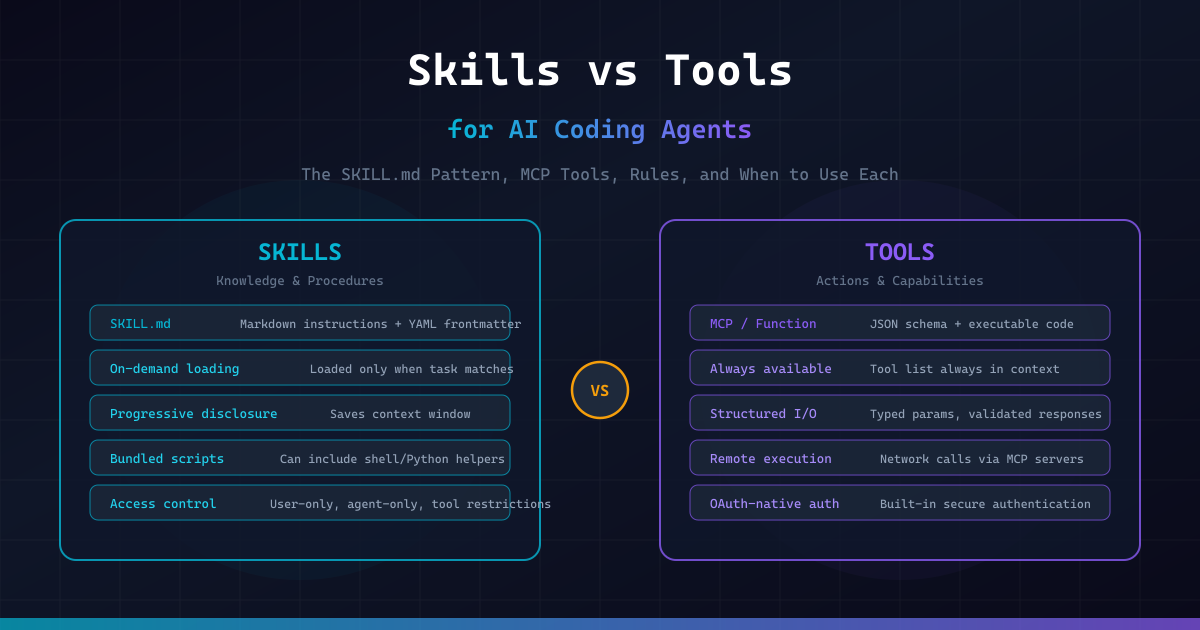
Skills teach the agent how to do things. Tools give the agent the ability to do things.
If skills teach you to cook, tools provide the kitchen instruments that let you do it. A skill is a set of instructions written in Markdown that the agent reads and follows. A tool is an executable function the agent can call to interact with the outside world — read a file, query a database, create a pull request.
This article covers:
- What Skills and Tools actually are — with concrete examples
- Skills vs Rules vs Commands — when to use each
- The SKILL.md standard — anatomy, frontmatter, and directory structure
- How to write Skills that actually work — the patterns that matter
- Real-world SKILL.md examples — from deployment to code review to security
- Common mistakes — and how to avoid them
- A Python skill validator — to lint your SKILL.md files before they fail silently
Skills vs Tools: The Fundamental Difference
What is a Tool?
A tool is an executable capability with a structured interface. When an agent "uses a tool," it generates a function call with typed parameters, the tool executes code (locally or remotely), and it returns structured results.
Tools come in several forms:
- Built-in tools — file read/write, terminal commands, grep, glob (built into the agent)
- MCP tools — remote capabilities exposed via the Model Context Protocol (e.g., Sentry, GitHub, database access)
- Function calls — custom functions registered via the API (e.g., LangChain tools, OpenAI function calling)
A tool definition looks like this:
{
  "name": "create_pull_request",
  "description": "Create a GitHub pull request",
  "parameters": {
    "type": "object",
    "properties": {
      "title": { "type": "string" },
      "body": { "type": "string" },
      "base": { "type": "string", "default": "main" },
      "head": { "type": "string" }
    },
    "required": ["title", "head"]
  }
}
Key characteristics of tools:
- Always available — tool definitions are injected into the agent's context at session start
- Structured I/O — typed parameters in, structured data out
- Execute code — they do something (API call, file operation, shell command)
- OAuth-native (MCP) — built-in authentication for remote services
- Costly in context — every tool's schema consumes tokens even when unused
What is a Skill?
A skill is a Markdown file (SKILL.md) that teaches the agent a procedure, workflow, or set of domain-specific instructions. When the agent encounters a task that matches a skill's description, it loads the skill's content and follows the instructions.
Skills don't execute code by themselves — they tell the agent how to use existing tools (and sometimes bundle helper scripts the agent can run).
---
name: deploy
description: >
  Deploy the application to production. Use when the user says
  "deploy", "ship it", "push to prod", or "release".
disable-model-invocation: true
---

## Deployment Procedure

1. Run the full test suite: `npm test`
2. If tests fail, STOP and report the failures
3. Build the production bundle: `npm run build`
4. Check for TypeScript errors: `npx tsc --noEmit`
5. Tag the release: `git tag -a v$(date +%Y%m%d) -m "Release"`
6. Push to production: `git push origin main --tags`
7. Verify deployment at https://staging.example.com
8. Report the deployed version and URL to the user

## Hard Rules
- NEVER skip the test step
- NEVER deploy if there are TypeScript errors
- If anything is ambiguous, STOP and ask the user
Key characteristics of skills:
- On-demand loading — the agent scans skill descriptions but only loads the full content when relevant (progressive disclosure)
- Markdown-based — plain text instructions, no code compilation needed
- Context-efficient — saves tokens by staying out of context until needed
- Composable — skills can reference other skills and supporting files
- Portable — the Agent Skills standard works across Claude Code, Codex, Builder.io, and more
The Kitchen Analogy
Think of it this way:
| Concept | Kitchen Analogy | AI Agent |
|---|---|---|
| Tool | A knife, oven, blender | file_read, terminal, MCP server |
| Skill | A recipe card | SKILL.md with step-by-step instructions |
| Rule | "Always wash hands before cooking" | CLAUDE.md / .cursorrules |
| Command | "Make me pasta" (explicit request) | /deploy, /review |
A chef (agent) needs both recipes (skills) and kitchen equipment (tools). Having a great knife doesn't help if you don't know the recipe. Having a recipe is useless without the tools to execute it.
Skills vs Rules vs Commands
These three concepts layer together but serve different purposes. Mixing them up is the #1 source of context pollution in AI coding setups.
Rules: The Non-Negotiables
Rules are always-on instructions that apply to every task. They live in files like CLAUDE.md, AGENTS.md, or .cursorrules.
# Project Context

- This is a Next.js 16 project with TypeScript strict mode
- Use pnpm, never npm or yarn
- Tests use Vitest, not Jest
- Never commit .env files
- Run `pnpm lint` before suggesting changes are complete
Rules should be short — under 100 lines. Every token in your rules file is consumed on every single session, even when you're working on something completely unrelated.
Litmus test: Would you want this instruction to apply even when you're not thinking about it? If yes → rule. If no → skill.
Commands: Explicit User Intent
Commands are deterministic — you type /command and the agent executes it. They're shortcuts for triggering specific behaviors.
Review the current git diff for:
1. Logic errors
2. Security issues
3. Performance concerns
4. Missing tests

Format as a numbered list with severity levels.
Commands are you taking the wheel. You know exactly what you want and you're telling the agent to do it.
Skills: On-Demand Expertise
Skills are agent-loaded. The agent decides whether it needs the skill based on the task at hand. This is the key difference from rules (always loaded) and commands (user-triggered).
---
name: database-migration
description: >
  Use when creating, modifying, or reviewing database migrations.
  Triggers on: schema changes, Drizzle ORM modifications,
  migration files, column additions or removals.
---

## Before Creating a Migration
1. Read the current schema in `src/db/schema.ts`
2. Check existing migrations in `src/db/migrations/`
3. Verify no pending migrations: `pnpm db:status`

## Creating the Migration
1. Modify the schema in `src/db/schema.ts` first
2. Generate the migration: `pnpm db:generate`
3. Never write migration SQL by hand — always use the generator

## After Creating
1. Run `pnpm db:migrate` on the dev database
2. Run integration tests: `pnpm test:integration`
3. If tests fail, do NOT modify the migration — drop and regenerate

## Hard Rules
- Never modify a committed migration file
- Never delete a migration file
- Always test against a fresh database: `pnpm db:reset && pnpm db:migrate`
This skill contains 30+ lines of migration-specific knowledge. In CLAUDE.md, it would consume context on every session — even when you're working on frontend components. As a skill, it loads only when the agent detects migration-related work.
The Decision Framework
| Question | Answer | Use |
|---|---|---|
| Should this apply to every task? | Yes | Rule (CLAUDE.md) |
| Is this a specialized multi-step workflow? | Yes | Skill (SKILL.md) |
| Does it need bundled scripts? | Yes | Skill (only option) |
| Is it a quick shortcut I want to trigger manually? | Yes | Command |
| Does it need to execute remote code? | Yes | Tool (MCP) |
| Does it need structured typed parameters? | Yes | Tool |
The Layering Strategy
The optimal setup layers all three:
- Layer 1:
AGENTS.md(always-on, cross-tool) — project architecture, conventions, hard constraints. Under 100 lines. - Layer 2:
CLAUDE.md(always-on, Claude-specific) — minimal. ReferenceAGENTS.mdfor shared context. Under 20 lines. - Layer 3: Skills (on-demand) — specialized workflows. Each can be detailed (up to 500 lines) because it only enters context when needed.
The result: your baseline context is lean (~120 lines), but deep capability is available on demand through skills.
Anatomy of a SKILL.md File
Every skill lives in its own folder. The folder must contain a SKILL.md file and can optionally include supporting files:
.claude/skills/
├── deploy/
│   ├── SKILL.md              # Required: instructions + metadata
│   ├── checklist.md           # Optional: detailed pre-deploy checklist
│   └── scripts/
│       └── smoke-test.sh      # Optional: executable script
├── code-review/
│   ├── SKILL.md
│   └── examples/
│       └── good-review.md     # Reference example
└── api-endpoint/
    ├── SKILL.md
    └── templates/
        └── endpoint.ts        # Template file
Frontmatter Reference
The YAML frontmatter at the top of SKILL.md controls how the skill behaves:
---
name: my-skill                    # Becomes /my-skill command
description: >                    # CRITICAL — this is for routing
  Short, keyword-rich description
  that helps the agent find this skill.
disable-model-invocation: true    # Only user can trigger via /name
user-invocable: false             # Only agent can trigger (background)
allowed-tools: Read Grep Bash     # Restrict available tools
context: fork                     # Run in isolated subagent
agent: Explore                    # Which subagent to use
model: claude-sonnet-4            # Override the model
effort: high                      # Effort level: low/medium/high/max
arguments: [filename, format]     # Named arguments for $filename, $format
---
The most important fields:
description— This is how the agent finds your skill. If the description doesn't match how users naturally describe the task, the skill will never trigger. Write it like keywords, not poetry.disable-model-invocation: true— For dangerous operations (deploy, delete, migrate). Forces the user to explicitly type/skill-name.context: fork— Runs the skill in an isolated subagent so it doesn't pollute your main conversation's context window.allowed-tools— Restrict what the agent can do within this skill. A review skill probably shouldn't be able to write files.
String Substitutions
Skills support dynamic values:
---
name: fix-issue
description: Fix a GitHub issue by number
arguments: [issue-number]
---

## Steps
1. Read issue #$issue-number from GitHub
2. Analyze the issue description and reproduce the bug
3. Implement the fix with tests
4. Create a PR referencing issue #$issue-number
Available substitutions:
$ARGUMENTS— full argument string$0,$1,$2— positional arguments$name— named arguments (fromargumentsfield)${CLAUDE_SESSION_ID}— unique session identifier${CLAUDE_SKILL_DIR}— path to the skill's folder
How to Write Skills That Actually Work
The #1 reason skills fail isn't the instructions — it's the description. If the agent can't find the skill, the code inside doesn't matter.
The Six Questions Every Skill Must Answer
- Trigger (Description): When exactly should the agent load this?
- Inputs: What info does it need before starting?
- Steps: What is the procedure?
- Checks: How do you prove it worked?
- Stop conditions: When should it pause and ask a human?
- Recovery: What happens if a check fails?
Pattern: The Deployment Skill
---
name: deploy
description: >
  Deploy the application to production or staging environments.
  Triggers on: deploy, ship, release, push to prod, go live.
disable-model-invocation: true
---

## Pre-Deploy Checks
1. Ensure you are on the `main` branch: `git branch --show-current`
2. Pull latest: `git pull origin main`
3. Run test suite: `pnpm test`
4. Run type check: `pnpm typecheck`
5. Run linter: `pnpm lint`
6. If ANY check fails → STOP and report the error. Do not proceed.

## Build
1. Clean previous build: `rm -rf .next`
2. Build production: `pnpm build`
3. If build fails → STOP and report the error

## Deploy
1. Tag the release: `git tag -a v$(date +%Y%m%d.%H%M) -m "Release"`
2. Push tags: `git push origin main --tags`
3. Wait for CI/CD pipeline to complete
4. Verify at: https://staging.onemancrew.dev

## Post-Deploy
1. Run smoke tests against production
2. Check for console errors in the browser
3. Report: deployed version, URL, and any warnings

## Recovery
- If deployment fails, do NOT retry automatically
- Report the failure and ask the user for next steps
Pattern: The Code Review Skill
---
name: code-review
description: >
  Review code changes for quality, security, and correctness.
  Triggers on: review, PR review, code review, check my code,
  look at this diff, review changes.
allowed-tools: Read Grep Glob
---

## Review Process

1. **Understand the scope**: Read the diff or changed files
2. **Check for bugs**: Logic errors, off-by-one, null handling
3. **Check for security**: SQL injection, XSS, exposed secrets, unsafe eval
4. **Check for performance**: N+1 queries, unnecessary re-renders, memory leaks
5. **Check for tests**: Are new code paths tested? Are edge cases covered?
6. **Check for style**: Does it follow the project conventions in AGENTS.md?

## Output Format

For each finding, report:
- **File and line**: exact location
- **Severity**: 🔴 Critical / 🟡 Warning / 🔵 Suggestion
- **Issue**: what's wrong
- **Fix**: how to fix it

## Stop Conditions
- If you find a 🔴 Critical issue, flag it immediately
- If the diff is larger than 500 lines, ask the user which files to focus on
Pattern: The API Endpoint Skill
---
name: api-endpoint
description: >
  Create new API endpoints following project conventions.
  Triggers on: new endpoint, API route, REST endpoint,
  create route, add API.
---

## Before Starting
1. Read `src/app/api/` to understand existing endpoint patterns
2. Check `src/lib/db/schema.ts` for available data models
3. Read `src/middleware.ts` for auth requirements

## Endpoint Structure
Every endpoint must include:
1. Input validation with Zod
2. Authentication check
3. Error handling with consistent format
4. TypeScript return types

## Template
Reference the template at `${CLAUDE_SKILL_DIR}/templates/endpoint.ts`

## After Creating
1. Add the endpoint to the API documentation in `docs/api.md`
2. Write at least one happy-path and one error test
3. Run `pnpm test` to verify
Pattern: The Security Audit Skill
---
name: security-audit
description: >
  Perform a security audit on code changes or the full codebase.
  Triggers on: security review, audit, vulnerability check,
  security scan, check for security issues.
context: fork
allowed-tools: Read Grep Glob
---

## Audit Checklist

### Authentication & Authorization
- [ ] Are all routes properly authenticated?
- [ ] Are authorization checks in place for protected resources?
- [ ] Are JWT tokens validated correctly?
- [ ] Are sessions properly invalidated on logout?

### Input Validation
- [ ] Is all user input sanitized?
- [ ] Are SQL queries parameterized (no string concatenation)?
- [ ] Is file upload validated (type, size, content)?
- [ ] Are redirects validated against a whitelist?

### Secrets & Configuration
- [ ] No hardcoded API keys, passwords, or tokens?
- [ ] Are `.env` files in `.gitignore`?
- [ ] Are secrets loaded from environment variables?
- [ ] No secrets in logs or error messages?

### Dependencies
- [ ] Run `npm audit` and report findings
- [ ] Check for known vulnerable packages
- [ ] Are dependencies pinned to specific versions?

## Output
Report findings in a table:
| Severity | Location | Issue | Recommendation |
Skills + Tools: Better Together
The most powerful pattern combines skills and tools. Skills use MCP tools to achieve tasks, and they can reference scripts in their skill folder.
Example: Skills That Use MCP Tools
---
name: triage-issue
description: >
  Triage and diagnose production issues using Sentry data.
  Triggers on: production error, Sentry issue, bug report,
  error triage, investigate error.
arguments: [issue-id]
---

## Triage Workflow

1. **Get issue details**: Use the Sentry MCP tool to fetch issue $issue-id
2. **Analyze the stack trace**: Identify the failing code path
3. **Find the source**: Read the relevant source files
4. **Check recent changes**: `git log --oneline -20 -- <failing-file>`
5. **Reproduce locally**: If possible, write a failing test
6. **Propose fix**: Implement and test the fix
7. **Report**: Summarize root cause, fix, and prevention strategy
Example: Skills With Bundled Scripts
---
name: setup-env
description: >
  Set up the development environment for a new contributor.
  Triggers on: setup, onboarding, new developer, getting started.
disable-model-invocation: true
---

## Setup Steps

1. Run the environment checker: `bash ${CLAUDE_SKILL_DIR}/scripts/check-env.sh`
2. If any checks fail, help the user fix them before proceeding
3. Install dependencies: `pnpm install`
4. Set up the database: `pnpm db:setup`
5. Copy environment template: `cp .env.example .env.local`
6. Ask the user to fill in their API keys in `.env.local`
7. Run the dev server: `pnpm dev`
8. Verify at http://localhost:3000
With the bundled script:
#!/bin/bash
echo "=== Environment Check ==="

# Node.js
if command -v node &> /dev/null; then
    NODE_VERSION=$(node -v)
    echo "✅ Node.js: $NODE_VERSION"
else
    echo "❌ Node.js not found. Install via: https://nodejs.org"
fi

# pnpm
if command -v pnpm &> /dev/null; then
    PNPM_VERSION=$(pnpm -v)
    echo "✅ pnpm: $PNPM_VERSION"
else
    echo "❌ pnpm not found. Install via: npm install -g pnpm"
fi

# Docker
if command -v docker &> /dev/null; then
    echo "✅ Docker: $(docker -v | cut -d' ' -f3 | tr -d ',')"
else
    echo "❌ Docker not found. Install via: https://docker.com"
fi

# Git
if command -v git &> /dev/null; then
    echo "✅ Git: $(git --version | cut -d' ' -f3)"
else
    echo "❌ Git not found"
fi

echo "========================="
Common Mistakes
Mistake 1: Stuffing Everything into CLAUDE.md
The most common failure. Developers write 300+ line CLAUDE.md files with coding standards, architecture docs, workflow instructions, and style guides. Research from ETH Zurich showed this directly: longer context files hurt agent performance. The agent follows some instructions, ignores others, and the inconsistency is worse than having no context file at all.
Fix: Move specialized workflows to skills. Keep CLAUDE.md under 100 lines.
Mistake 2: Vague Skill Descriptions
# ❌ Bad — too vague
---
description: Helps with code quality
---

# ✅ Good — keyword-rich and specific
---
description: >
  Review code for security vulnerabilities, performance issues,
  and test coverage gaps. Triggers on: review, PR check, audit code,
  check my changes, look at this diff.
---
The agent scans descriptions to decide which skills to load. If your description doesn't contain the keywords that match how users naturally describe tasks, the skill will never trigger. Claude Code tends to under-trigger rather than over-trigger — so be slightly "pushy" in descriptions.
Mistake 3: Skills That Are Really Rules
If a skill applies to every single task, it's not a skill — it's a rule.
# ❌ This belongs in CLAUDE.md, not a skill
---
name: coding-standards
description: General coding standards for the project
---
- Use TypeScript strict mode
- Use pnpm, not npm
- Follow ESLint config
Mistake 4: The Encyclopedia Skill
If a skill reads like a wiki page, chop it up. Put heavy reference docs in separate files and let the skill reference them:
# ✅ Keep SKILL.md lean, reference supporting files
---
name: api-design
description: Design and implement REST API endpoints
---

## Quick Reference
See `${CLAUDE_SKILL_DIR}/api-conventions.md` for the full API style guide.
See `${CLAUDE_SKILL_DIR}/templates/` for endpoint templates.

## Workflow
1. Read the API conventions (link above)
2. Choose the right template
3. Implement following the conventions
4. Add tests and documentation
Mistake 5: LLM-Generated Context Files
Research shows that asking an LLM to generate your context files produces worse results than writing them yourself. LLM-generated files are verbose, generic, and full of information the agent can already infer from the codebase.
Write your skills by hand. You know your project's quirks better than any LLM can infer.
SKILL.md Validator
Here's a Python tool that validates your SKILL.md files against best practices:
import re
import sys
from pathlib import Path
from dataclasses import dataclass, field


@dataclass
class ValidationResult:
    """Result of validating a single SKILL.md file."""
    path: str
    errors: list[str] = field(default_factory=list)
    warnings: list[str] = field(default_factory=list)
    info: list[str] = field(default_factory=list)
    score: int = 100


def parse_frontmatter(content: str) -> tuple[dict, str]:
    """Extract YAML frontmatter and body from SKILL.md content."""
    match = re.match(r'^---\s*\n(.*?)\n---\s*\n(.*)', content, re.DOTALL)
    if not match:
        return {}, content

    frontmatter_text = match.group(1)
    body = match.group(2)

    # Simple YAML parsing (key: value)
    frontmatter = {}
    current_key = None
    current_value = []

    for line in frontmatter_text.split('\n'):
        # Multi-line value continuation
        if current_key and (line.startswith('  ') or line.startswith('\t')):
            current_value.append(line.strip())
            continue
        elif current_key:
            frontmatter[current_key] = ' '.join(current_value)
            current_key = None
            current_value = []

        key_match = re.match(r'^(\w[\w-]*):\s*(.*)', line)
        if key_match:
            key = key_match.group(1)
            value = key_match.group(2).strip()
            if value == '>' or value == '|':
                current_key = key
                current_value = []
            else:
                frontmatter[key] = value

    if current_key:
        frontmatter[current_key] = ' '.join(current_value)

    return frontmatter, body


def validate_skill(file_path: Path) -> ValidationResult:
    """
    Validate a SKILL.md file against best practices.

    Checks:
    - Has valid frontmatter with required fields
    - Description is keyword-rich and specific
    - Body has clear workflow steps
    - Body has success criteria or checks
    - Body has stop conditions
    - File length is reasonable
    - No common anti-patterns
    """
    result = ValidationResult(path=str(file_path))

    try:
        content = file_path.read_text(encoding='utf-8')
    except Exception as e:
        result.errors.append(f"Cannot read file: {e}")
        result.score = 0
        return result

    # Check frontmatter exists
    frontmatter, body = parse_frontmatter(content)

    if not frontmatter:
        result.errors.append("Missing YAML frontmatter (--- block)")
        result.score -= 30

    # Check required fields
    if 'name' not in frontmatter:
        result.errors.append("Missing 'name' in frontmatter")
        result.score -= 15

    if 'description' not in frontmatter:
        result.errors.append("Missing 'description' in frontmatter — agent cannot find this skill")
        result.score -= 30
    else:
        desc = frontmatter['description']

        # Check description quality
        if len(desc) < 20:
            result.warnings.append(
                f"Description is very short ({len(desc)} chars). "
                "Add keywords matching how users describe this task."
            )
            result.score -= 10

        if len(desc) > 300:
            result.warnings.append(
                f"Description is very long ({len(desc)} chars). "
                "Keep it concise — the agent only needs routing keywords."
            )
            result.score -= 5

        # Check for vague descriptions
        vague_words = ['helps with', 'useful for', 'general', 'various', 'miscellaneous']
        for word in vague_words:
            if word in desc.lower():
                result.warnings.append(
                    f"Description contains vague phrase '{word}'. "
                    "Use specific trigger keywords instead."
                )
                result.score -= 5

        # Check for trigger keywords
        trigger_phrases = ['use when', 'triggers on', 'use this when', 'activate when']
        has_trigger = any(p in desc.lower() for p in trigger_phrases)
        if not has_trigger:
            result.warnings.append(
                "Description doesn't explicitly state when to trigger. "
                "Add 'Use when...' or 'Triggers on:' for better routing."
            )
            result.score -= 5

    # Check body quality
    lines = body.strip().split('\n')
    non_empty_lines = [l for l in lines if l.strip()]

    if len(non_empty_lines) < 5:
        result.warnings.append(
            f"Body is very short ({len(non_empty_lines)} lines). "
            "Add workflow steps, checks, and stop conditions."
        )
        result.score -= 10

    if len(non_empty_lines) > 200:
        result.warnings.append(
            f"Body is very long ({len(non_empty_lines)} lines). "
            "Consider splitting into SKILL.md + supporting files."
        )
        result.score -= 5

    # Check for workflow structure
    has_numbered_steps = any(re.match(r'^\d+\.', l.strip()) for l in lines)
    has_headers = any(l.strip().startswith('#') for l in lines)

    if not has_numbered_steps and not has_headers:
        result.warnings.append(
            "No numbered steps or headers found. "
            "Skills work best as structured procedures."
        )
        result.score -= 10

    # Check for success criteria
    body_lower = body.lower()
    success_keywords = ['success criteria', 'done when', 'verify', 'check', 'confirm', 'validate']
    has_success = any(kw in body_lower for kw in success_keywords)
    if not has_success:
        result.warnings.append(
            "No success criteria found. Add a section defining 'done'."
        )
        result.score -= 5

    # Check for stop conditions
    stop_keywords = ['stop', 'pause', 'ask the user', 'do not proceed', 'halt', 'abort']
    has_stop = any(kw in body_lower for kw in stop_keywords)
    if not has_stop:
        result.warnings.append(
            "No stop conditions found. Define when the agent should "
            "pause and ask for human input."
        )
        result.score -= 5

    # Check for anti-patterns
    if 'always' in body_lower and body_lower.count('always') > 3:
        result.info.append(
            "Many 'always' directives found. If these apply to every task, "
            "consider moving them to CLAUDE.md instead."
        )

    # Check for dangerous operations without safety
    dangerous = ['rm -rf', 'drop table', 'delete from', 'force push', '--force']
    for d in dangerous:
        if d in body_lower and 'disable-model-invocation' not in str(frontmatter):
            result.warnings.append(
                f"Contains dangerous operation '{d}' but "
                "disable-model-invocation is not set to true."
            )
            result.score -= 10

    # Bonus points
    if 'context: fork' in content:
        result.info.append("Using subagent isolation (context: fork) — good practice")

    if 'allowed-tools' in str(frontmatter):
        result.info.append("Tool restrictions in place — good security practice")

    result.score = max(0, min(100, result.score))
    return result


def validate_skills_directory(skills_dir: str) -> list[ValidationResult]:
    """Validate all SKILL.md files in a directory tree."""
    skills_path = Path(skills_dir)
    results = []

    for skill_file in skills_path.rglob("SKILL.md"):
        results.append(validate_skill(skill_file))

    return results


def print_report(results: list[ValidationResult]) -> None:
    """Print a formatted validation report."""
    print("=" * 60)
    print("  SKILL.md VALIDATION REPORT")
    print("=" * 60)

    if not results:
        print("\n  No SKILL.md files found.")
        return

    total_score = 0
    for result in results:
        total_score += result.score
        grade = "A" if result.score >= 90 else "B" if result.score >= 75 else "C" if result.score >= 60 else "F"

        print(f"\n  [{grade}] {result.path} (score: {result.score}/100)")

        for error in result.errors:
            print(f"    ❌ {error}")
        for warning in result.warnings:
            print(f"    ⚠️  {warning}")
        for info in result.info:
            print(f"    ℹ️  {info}")

    avg = total_score / len(results) if results else 0
    print(f"\n{'=' * 60}")
    print(f"  Skills validated: {len(results)}")
    print(f"  Average score: {avg:.0f}/100")
    print("=" * 60)


if __name__ == "__main__":
    search_paths = sys.argv[1:] if len(sys.argv) > 1 else [
        ".claude/skills",
        ".windsurf/skills",
        ".cursor/skills",
    ]

    all_results = []
    for path in search_paths:
        if Path(path).exists():
            print(f"Scanning: {path}")
            all_results.extend(validate_skills_directory(path))

    if not all_results:
        print("No SKILL.md files found in default locations.")
        print("Usage: python skill_validator.py <path-to-skills-dir>")
    else:
        print_report(all_results)
Starter Skill Library
If you're setting up AI coding for real production work, start with these essential skills:
| Skill | Purpose |
|---|---|
deploy | Pre-deploy checks, build, tag, push, verify |
code-review | Security, performance, test coverage audit |
database-migration | Schema changes, migration generation, testing |
api-endpoint | Create endpoints following project conventions |
setup-env | Onboard new developers with environment checks |
security-audit | Comprehensive security checklist |
pr-hygiene | Commit messages, changelog, PR formatting |
debugging | Reproduce issues, identify root cause, verify fix |
You don't need all of these on day one. Start with 2–3 for your most common workflows, then grow the library as patterns emerge.
Key Takeaways
- Skills teach how, Tools give ability — a skill is a recipe, a tool is a kitchen instrument. You need both.
- The description is everything — if the agent can't find your skill from the description, nothing else matters. Write keyword-rich, specific descriptions.
- Rules should be short, skills should be deep — keep
CLAUDE.mdunder 100 lines. Put specialized knowledge in skills where it loads on demand. - Don't stuff
CLAUDE.md— the ETH Zurich finding is clear: longer always-on context = worse performance. - Use
disable-model-invocation: truefor dangerous operations — deployment, database migration, and deletion should require explicit user intent. - Use
context: forkfor heavy skills — run them in subagents to keep your main context clean. - Skills and MCP tools are complementary, not competing — skills can instruct the agent to use specific MCP tools as part of their workflow.
- Write skills by hand — LLM-generated context files are consistently worse than human-written ones.
- Answer the six questions — trigger, inputs, steps, checks, stop conditions, recovery. Every skill needs all six.
- Start small — 2–3 well-crafted skills beat 20 mediocre ones. Grow your library as patterns emerge.
📂 Source Code
All skill examples and the validator from this article are available on GitHub: OneManCrew/skills-vs-tools-ai-agents